 DAMTAGG
큐 돌려놓고어디든 가세요. Queue up.Walk away.
매칭 잡히면 폰이 울리고, 수락부터 밴픽, 룬까지 폰에서 끝. PC에 켜 둔 롤 클라이언트를 그대로 조종해요. Your phone buzzes when a match pops. Accept, pick, ban and set runes from there. It drives the League client running on your PC.

PC 앞에 없어도 되는 것들Things you can do away from your desk
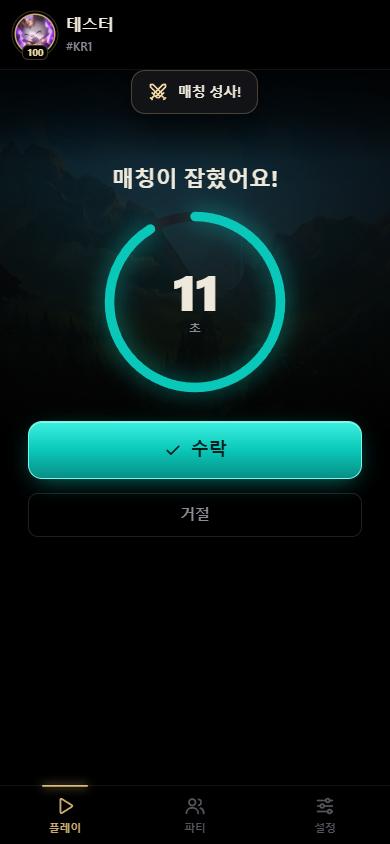
매칭 잡히면 바로 알림Know the moment a match pops
폰 화면이 꺼져 있어도 알림이 와요. 수락할지 말지는 버튼 하나로.Alerts come through even with the screen off. Accept or decline with one button.
- 매칭 성사 알림과 진동
- Match found alert and vibration
- 수락까지 남은 시간 표시
- Countdown to accept
- 누가 거절해서 취소되면 그것도 알려줘요
- Tells you when someone declines
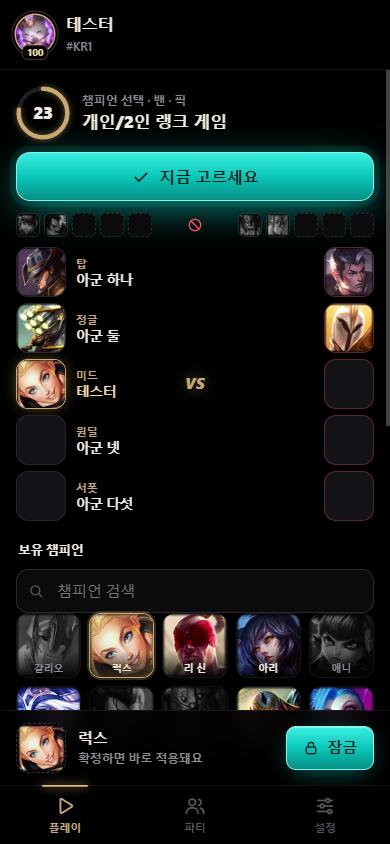
밴픽도 폰으로Pick and ban from your phone
우리 팀이 뭘 고르는지, 지금 누가 밴하는 중인지 한 화면에 다 보여요.See what your team is hovering and who's banning, all on one screen.
- 밴 · 픽 · 잠금
- Ban, pick, lock in
- 팀원이 고른 챔피언, 밴 진행 상황
- Teammates' picks and the ban in progress
- 밴된 챔피언은 흑백으로 표시
- Banned champions shown in grey
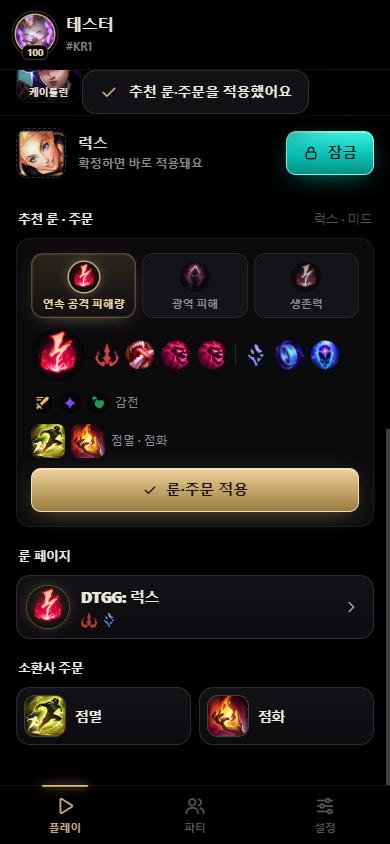
룬 · 스펠은 터치 한 번Runes and spells in one tap
롤 클라이언트가 추천하는 룬 페이지 3개 중에 골라서 바로 적용해요. 소환사 주문도 같이 바뀌어요.Choose one of the three rune pages the client recommends and apply it. Summoner spells change with it.
- 라이엇 추천 룬 페이지 3종
- Riot's three recommended pages
- 소환사 주문 함께 적용
- Summoner spells applied too
- 내 룬 페이지로 바로 바꾸기
- Switch to one of your own pages
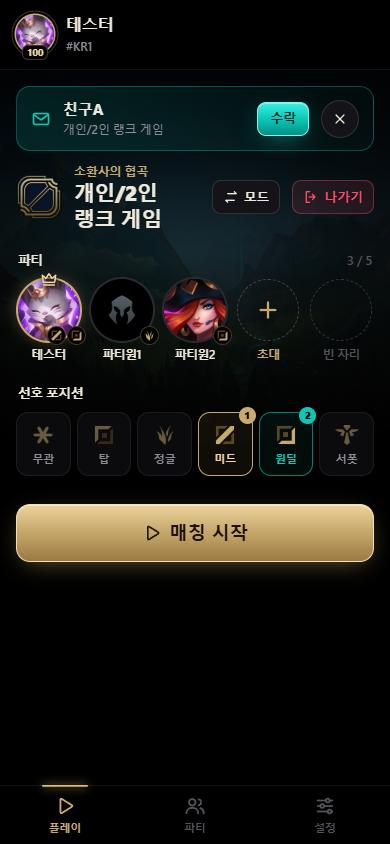
로비랑 파티도Lobby and party too
큐 돌리기 전에 할 일도 폰에서. 파티는 그대로 둔 채 모드만 바꿀 수 있어요.Everything before the queue, too. Change modes without breaking up the party.
- 큐 시작 · 취소, 선호 포지션
- Start or cancel queue, preferred positions
- 초대 수락, 파티원 초대 · 강퇴
- Accept invites, invite or kick
- 아레나 팀 나누기
- Split Arena teams
설치하고 QR 찍으면 끝Install, scan, done
대신 고르거나
누르지 않아요It never picks
or clicks for you
DAMTAGG는 리모컨이에요. 수락도, 밴픽도 내가 폰에서 눌러야 움직여요.DAMTAGG is a remote. Nothing happens until you tap it on your phone.
자주 묻는 질문Questions
무료예요?Is it free?
네, PC 프로그램도 폰 앱도 무료예요. 폰 앱에는 작은 광고가 나올 수 있어요.Yes. Both the PC program and the phone app are free. The phone app may show a small ad.
아이폰도 돼요?Does it work on iPhone?
돼요. QR로 열린 페이지를 Safari에서 공유 → 홈 화면에 추가 하면 앱처럼 쓸 수 있어요. 안드로이드는 전용 앱이 설치돼요.Yes. Open the page from the QR code in Safari and choose Share → Add to Home Screen. Android installs a dedicated app.
PC랑 같은 와이파이여야 해요?Does my phone need the same Wi-Fi?
아니요. 암호화된 연결이라 밖에서 데이터로도 돼요.No. It's an encrypted connection that works over mobile data too.
계정 정지되는 거 아니에요?Can this get my account banned?
DAMTAGG는 자동으로 수락하거나 고르는 기능이 없고, 롤 클라이언트가 원래 열어 둔 기능만 써요. 폰으로 누르는 건 PC에서 클릭하는 것과 같아요. 다만 DAMTAGG는 라이엇 공식 앱이 아니에요.DAMTAGG has no automatic accept or pick and only uses features the client already exposes. Tapping on your phone is the same as clicking on your PC. DAMTAGG is not an official Riot app.
내 정보는 어디로 가요?Where does my data go?
내 PC와 내 폰 사이에서만 오가고, 어디에도 저장하지 않아요. 연결 정보도 DAMTAGG를 끄면 사라져서 PC방 같은 공용 PC에도 남지 않아요. 자세한 건 개인정보처리방침에 있어요.It only travels between your PC and your phone and is never saved. Even the pairing disappears when DAMTAGG closes, so nothing is left on a shared PC. Details in the privacy policy.